
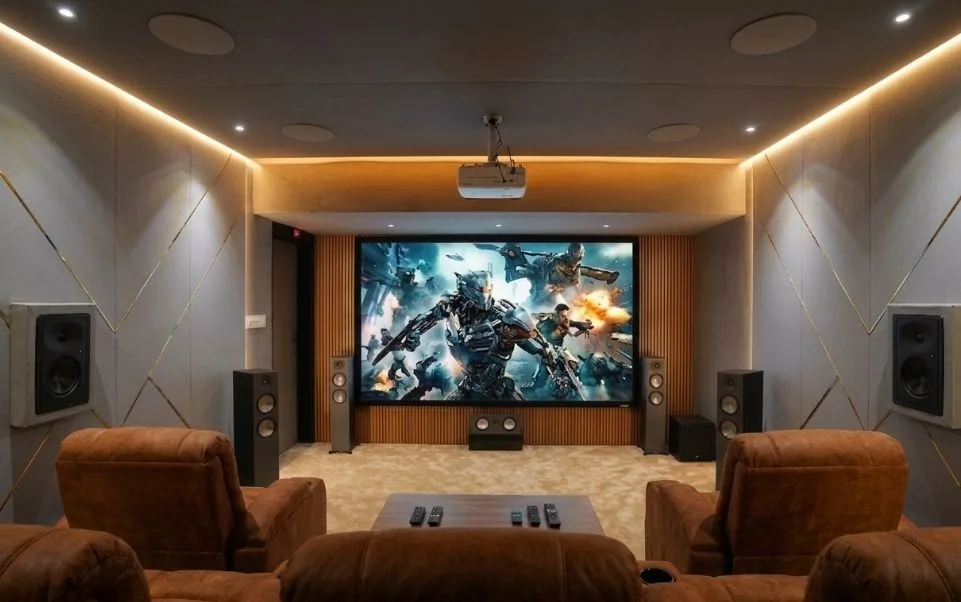
9.1 Configuration Explained: Complete Setup Guide for Immersive Surround Sound

A 9.1 configuration uses nine speakers and one subwoofer arranged around the listening room to create layered, directional audio that wraps around you from every side. If you have been wondering whether it is worth stepping up from a 5.1 or 7.1 setup, for a dedicated home cinema room, yes, it makes a real difference. For a small living room, probably not.
This blog explains what a 9.1 surround sound system involves, how to set one up properly, and whether 9.1 surround sound system is the right choice for your space before you spend anything.
9.1 Configurations
What Is a 9.1 Setup?
A 9.1 setup is a surround sound system with nine full-range speakers and a single subwoofer. It builds on the familiar 7.1 layout by adding two more speakers, usually a pair of front wide channels positioned between the front left/right and the side surrounds. These extra two channels fill in a gap in the soundstage that 7.1 systems leave slightly empty on the outer edges of the front field.
The result is a more continuous, unbroken sense of sound travelling around the room, which matters most during action scenes, live performances, and anything with a lot of lateral movement in the audio mix.
What Is a 9.1 Channel Layout?
The 9 speakers in a standard 9.1 channel layout are:
- Front Right & Front Left
- Centre Channel
- Side Surround Left & Right
- Rear Surround Left and Right
- Front Wide Left and Right
The subwoofer (9.1) handles bass frequencies and is usually placed in a front corner or near the front wall for better low-end response.
What Does 9.1 Channel Mean?
The numbers in any channel configuration tell you how many speakers are in the system. The first number is the count of full-range speakers, and the second is obviously the number of subwoofers. So 9.1 means nine speakers handling the full audio range, plus one subwoofer for bass. A 9.2 system simply adds a second subwoofer.
This naming convention applies across all formats. A 5.1 has five speakers and one sub. A 7.1 has seven. The logic is consistent.
What Does 9.2 Mean on a Receiver?
A receiver labelled 9.2 means it can process and output audio to nine main speakers and two subwoofers simultaneously. Two subwoofers are useful in larger rooms where a single sub struggles to distribute bass evenly throughout the space. With two subs placed at different positions, you get more balanced low-frequency response across the seating area rather than one strong spot and several weaker ones.
Not every home theater needs 9.2, but if your room is on the bigger side, or you find bass response unbalanced with a single sub, a 9.2 receiver gives the flexibility to balance that.
What Is the Best Dolby Atmos Setup?
Dolby Atmos works best with a combination of bed channels (the standard horizontal speakers) and height channels. A 7.1.4 or 9.1.4 layout is widely considered ideal for home use. The .4 refers to four height speakers, either ceiling-mounted or upward-firing, which allow Atmos to place sounds above the listener.
For purely horizontal Atmos, a 7.1.2 or 9.1.2 is a practical starting point. The Atmos mix uses object-based audio, meaning sound engineers place sounds in three-dimensional space rather than assigning them to fixed channels, so more speakers generally give the renderer more to work with.
Is 7.1 Better Than Dolby Atmos?
These two things are not directly comparable because they describe different aspects of audio. 7.1 refers to the number as well as the arrangement of speakers. Dolby Atmos is an audio format, a way of encoding and decoding sound.
You can have a 7.1 system playing a standard surround mix, or a 7.1.4 system playing a Dolby Atmos mix. Atmos-encoded content played on a capable system with height channels will generally sound more three-dimensional than a standard 7.1 mix. But a well-set-up 7.1 system playing quality audio will still outperform a poorly placed Atmos rig.
The format and the hardware both matter. Neither alone is sufficient.
Also Read: 5.1 vs 7.1 vs Dolby Atmos: Which Sound System is Best?
How to Set Up 9.1 Surround Sound?
Home theater speaker placement is what separates a 9.1 system that sounds good from one that just looks impressive on paper. Getting the physical positioning right is half the job.
Here is a practical placement guide for a standard rectangular room:
Front Left and Right: Angle them inward toward the main seating position. Position them at close to ear height when seated, or a little above.
Centre Channel: Directly above or below the screen, aimed at the listening position. You should keep it as close to the screen as possible in order to make dialogue and on-screen action feel smooth.
Side Surrounds: The side surrounds should be positioned to the right and left of the main seat, around 90 to 110 degrees from the front. Slightly above ear height works well for most rooms.
Rear Surrounds: Behind the seating area at roughly 135 to 150 degrees. These handle atmospheric effects and ambient sound, so they do not need to be directly at ear level.
Front Wide Channels: Position front wide channels at roughly 60 to 70 degrees from the centre, between the front LR and the sides. These bridge the gap in the front soundstage.
Subwoofer: Experiment with corner placement first. Many rooms respond well to a sub near the front wall. Running a subwoofer crawl test (placing the sub at your seat and listening from different room positions) helps identify the best spot.
Once physically placed, run your AV receiver’s auto-calibration tool, such as Audyssey, MCACC, or YPAO, depending on the brand. These measure your room’s acoustic response and adjust speaker levels, distances, and EQ accordingly.
What Does 9.1.4 Mean?
The three numbers in a format like 9.1.4 follow a specific pattern: horizontal speakers, subwoofers, height speakers. So 9.1.4 means nine standard speakers, one subwoofer, and four height channels.
The height channels in a home theater audio setup like 9.1.4 are what enable full three-dimensional audio. They are usually installed in the ceiling above the listening area, two in front and two behind, or achieved using upward-firing Atmos-enabled speakers placed on top of floor-standing units.
9.1.4 is considered a high-performance configuration for dedicated home cinema rooms. It gives Dolby Atmos, DTS:X, and Auro-3D formats enough channels to place sounds accurately across a full sphere rather than just a horizontal plane. The trade-off is room size and installation effort. Running cables to ceiling speakers or fitting in-ceiling units adds time and cost. If the room allows it, the payoff in audio depth is worth it for serious home cinema use.
Is 9.1 Dolby Atmos?
Not on its own. A standard 9.1 layout without height channels cannot play Dolby Atmos in its full form. Atmos requires at least some height element to reproduce the overhead dimension that defines the format.
That said, some AV receivers can use the front wide channels in a 9.1 system to create a limited height simulation using processing. This is not the same as true overhead Atmos, but it can improve the sense of vertical space compared to a flat 7.1 mix.
If Dolby Atmos is your goal, the cleanest path is to plan for a 9.1.2 or 9.1.4 layout from the start. This means selecting a receiver with enough amplifier channels, and deciding early whether you want in-ceiling speakers, upward-firing modules, or a combination of both.
What is home theater configuration in the context of Atmos? It is the total picture: how many speakers, where they sit in the room, and whether the receiver can decode and assign the right audio information to each one. Getting those three things aligned is what produces a convincing result.
When you are ready to plan or build your home cinema, our team at Climax Cinemas can help with everything from layout advice to full installation. We work with a range of room sizes and budgets, and we are happy to talk through what configuration makes sense for your space before any decisions are made.
Q1: Do I need a special AV receiver for a 9.1 setup?
A1: Yes. A standard 5.1 or 7.1 receiver will not have enough amplifier channels. You need a receiver that supports at least nine channels of amplification. Some 9-channel receivers are also configurable for 9.1.2 or 9.1.4 Atmos if you want to expand later, so it is worth checking that option when choosing hardware.
Q2: Is a 9.1 setup worth it in a small room?
A2: Probably not. In a small room, nine speakers placed correctly will overlap each other acoustically, creating phase issues and an overly busy, muddied sound rather than a cleaner surround field. A well-set-up 5.1 in a smaller space will outperform a crowded 9.1 in the same room. The 9.1 configuration is designed for rooms where the speakers can be spread far enough apart to each have their own distinct role in the soundstage. As a rough guide, rooms of around 20 square metres or more tend to be where 9.1 starts to justify itself. If space is a concern, a 5.1.2 or 7.1.2 Atmos setup is a more practical route to immersive audio without overcrowding the room.