
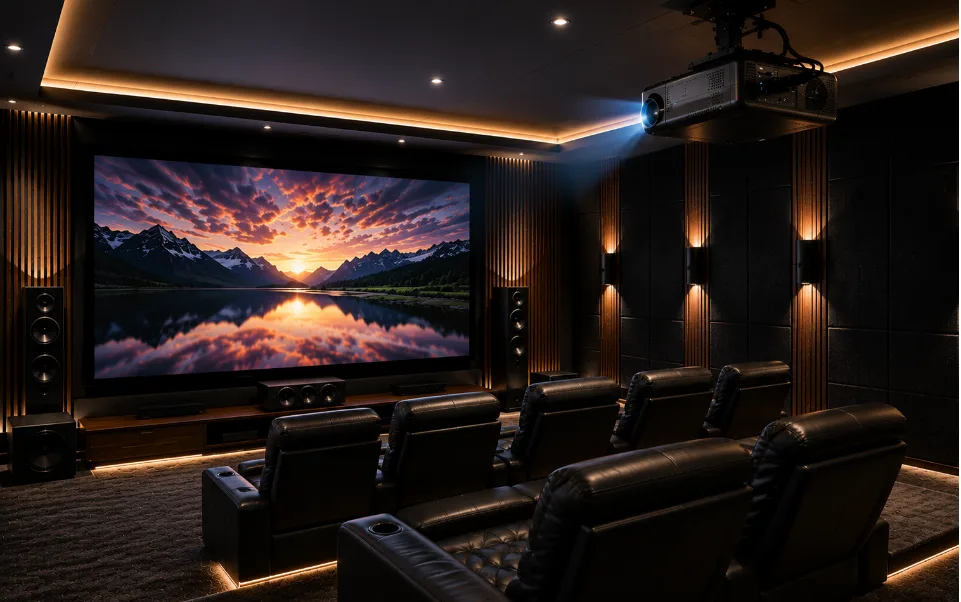
Where Should You Install a Home Theater Projector?

The best place to install a home theater projector is on the ceiling, centred with the screen, at a distance and height matched to your projector’s throw ratio. Ceiling mounting keeps the beam clear of furniture and people, gives a stable image, and suits most living rooms. Shelf or table placement works too, provided the lens sits level with the screen’s centre.
Key Takeaways
- Ceiling mounting is usually the most practical way to install home theater projector equipment without obstruction
- Throw distance depends on your projector’s throw ratio and desired screen width
- A dedicated home theater projector screen improves image quality far more than a plain wall
- Comparing a home theater projector vs TV comes down to screen size, room lighting, and viewing habits
- Deciding between full HD vs 4K projector models affects both budget and picture sharpness
- Getting help from established home theatre dealers in Kerala saves time and avoids placement mistakes
Introduction
Deciding where to install a home theater projector matters just as much as choosing the projector itself. Get the placement wrong and even an expensive unit will look dim, blurry, or oddly shaped on the wall. Get it right and a modest projector can still produce a genuinely enjoyable picture. This guide explains the practical side of positioning, covering ceiling mounts, shelf setups, throw distance, and the small details that often get missed. If you are planning a proper setup, our team at Climax Cinemas can walk you through the process room by room, based on your actual space rather than a generic diagram.
Ceiling Mounting: The Most Common Choice
For most living rooms, ceiling mounting is the preferred way to install a home theater projector. It keeps the unit out of the way of foot traffic, pets, and furniture rearrangements, and it usually delivers the most consistent image because the projector stays in one fixed position.
A ceiling mount also solves a problem many people don’t think about until later: cable management. Running power and HDMI cables through the ceiling and down a wall looks far tidier than trailing wires across a shelf or floor.
Things to Check Before Mounting
- Make sure the ceiling can support the mount and projector weight
- Keep the lens centred with the middle of the screen, not just centred in the room
- Leave enough clearance so the beam doesn’t clip a ceiling fan or light fixture
- Check that the mount allows small adjustments for focus and keystone correction
Shelf and Table Placement
Not every home suits ceiling mounting, and that’s fine. A shelf, media unit, or dedicated table can work just as well, particularly in rented spaces where drilling into the ceiling isn’t an option.
If the projector sits too low or too high compared to the screen, the image can appear stretched or trapezoid shaped. Most modern projectors include some correction for this, but it’s better to get the physical placement right first rather than relying on digital fixes, which can soften the picture slightly.
Working Out the Right Throw Distance
Every projector has a throw ratio, which tells you how far it needs to sit from the screen to produce a specific image width. As a general rule, standard throw projectors need to sit around 1.5 to 2 times the screen width away from the screen. Short throw models can sit much closer, while long throw units need considerably more room depth.
How to Estimate It Yourself?
- Check your projector’s throw ratio in the manual or spec sheet
- Decide on your target screen width
- Multiply the width by the throw ratio to get your ideal distance
- Allow a small buffer for mounting brackets and cable routing
For example, a 120 inch screen mounted 10 to 14 feet away typically needs a throw ratio between roughly 1.15 and 1.6, which falls into the standard throw category. If your room can’t accommodate that depth, a short throw model becomes the more sensible choice.
Choosing Between Full HD and 4K
The full HD vs 4K projector question comes up in almost every consultation we handle. Full HD projectors are generally more affordable and still produce a sharp, enjoyable picture on screens up to around 120 inches. Once you go beyond that, or if you sit closer to a larger screen, the extra detail in 4K becomes easier to notice.
A reliable full HD projector can suit a family room perfectly well, while 4K makes more sense for a dedicated cinema room where picture detail is the main priority.
Also Read:Full HD vs 4K Projector: Which One is Better?
Projector Screen or Bare Wall
It’s tempting to skip the screen and project straight onto a painted wall, and plenty of people do it without major complaints. But a proper home theater projector screen genuinely improves contrast, colour accuracy, and brightness uniformity, especially in rooms with imperfect wall surfaces.
Screens also come in different gain levels and textures suited to different lighting conditions, something a plain wall simply can’t replicate no matter how smooth the paint job.
Home Theater Projector vs TV
The home theater projector vs TV debate usually comes down to three things: room size, ambient light, and how large you want the picture. Projectors win comfortably on screen size for the price, easily reaching 100 to 150 inches where an equivalent TV would cost considerably more.
TVs, on the other hand, handle bright rooms better and need less setup. If your room gets a lot of daylight and blackout curtains aren’t practical, a TV might suit your lifestyle better than a projector, regardless of screen size ambitions.
Also Read:Home Theater Projector vs TV: Which Offers the Best Movie Experience?
Mounting Options
| Placement Type | Best For | Cable Management | Flexibility |
|---|---|---|---|
| Ceiling mount | Dedicated theatre rooms | Neat, hidden routing | Fixed once installed |
| Shelf or table | Rented spaces, casual setups | Visible, needs tidying | Easy to move or adjust |
| Short throw unit | Small or narrow rooms | Moderate | Good for tight spaces |
| Long throw unit | Large, deep rooms | Neat with ceiling mount | Best for big screens |
Getting Professional Help with Home Cinema Installation
While a lot of this can be worked out with a tape measure and some patience, proper home cinema installation still benefits from an experienced eye. Small errors in angle or distance are easy to miss until the projector is already running, and by then, adjusting things can mean redrilling holes or repositioning furniture.
Working with established home theatre dealers in Kerala means someone has already accounted for your room’s lighting, wall colour, seating distance, and acoustic needs before a single cable gets fitted. It saves a fair amount of trial and error.
Conclusion
Deciding where to install a home theater projector isn’t complicated once you understand throw distance, mounting options, and how your room’s lighting behaves. Ceiling mounts suit most dedicated setups, while shelves work well for flexible or rented spaces. Whether you choose full HD or 4K, and whichever screen size you settle on, getting the placement right from the start makes the biggest difference to picture quality.
Frequently Asked Questions (FAQs)
Q1: How high should a home theater projector be mounted?
A1: The lens should sit level with the vertical centre of the screen, which usually works out to somewhere between 8 and 10 feet for standard ceiling heights, depending on screen size and throw ratio.
Q2: Can a home theater projector work well in a room with windows?
A2: Yes, but ambient light reduces contrast and colour depth noticeably. Using blackout curtains or a high gain screen helps offset the brightness loss during daytime viewing.
Q3: Is it better to hire installers or set up a home theater projector myself?
A3: A basic setup can be done independently with careful measuring, though professional home cinema installation reduces the chance of alignment errors and generally gives a more polished, longer lasting result.
Ready to Set Up Your Home Theater?
Whether you are deciding between a full HD and 4K projector or trying to work out the right screen size for your room, reach out to our team at Climax Cinemas for a proper site assessment and installation suited to your space.